 ChessMovio
 Engine Analysis
Analyze positions with the built-in Stockfish engine
ChessMovio includes a bundled Stockfish engine for analyzing chess positions. Stockfish is the strongest open-source chess engine in the world, and having it built directly into the app means you can analyze any position without an internet connection.
What Is Stockfish?
Stockfish is a free, open-source chess engine and one of the strongest in the world. It evaluates positions by searching millions of moves ahead and provides an objective assessment of who stands better and what the best continuation is. ChessMovio bundles the Stockfish binary directly, so no additional downloads are required.
Toggling the Engine
You can turn the engine on and off depending on whether you want analysis for the current position.
macOS only: Use the engine button in the toolbar at the top of the window to toggle analysis on and off.
On iOS, the engine toggle is available as an overlay button on the chess board. Tap it to start or stop analysis for the current position.
When the engine is active, analysis begins immediately for whatever position is currently displayed on the board. Moving to a new position automatically restarts the analysis.
Understanding the Evaluation
When the engine is running, it displays several pieces of information:
Evaluation Score
The most prominent number is the evaluation score, measured in centipawns (hundredths of a pawn). For example:
- +0.50 means White is ahead by about half a pawn.
- -1.20 means Black is ahead by about 1.2 pawns.
- 0.00 means the position is roughly equal.
The score is color-coded to make it easy to read at a glance -- positive values favor White and negative values favor Black.
When the engine detects a forced checkmate, the evaluation changes to a mate score (for example, M5 meaning checkmate in 5 moves).
Eval Bar
A vertical evaluation bar appears alongside the chess board. It fills with white or black proportionally to the evaluation, giving you an instant visual sense of who is winning.
Best Move and Principal Variation
The engine shows the best move it has found, along with the principal variation (PV) -- the sequence of moves the engine considers optimal play for both sides.
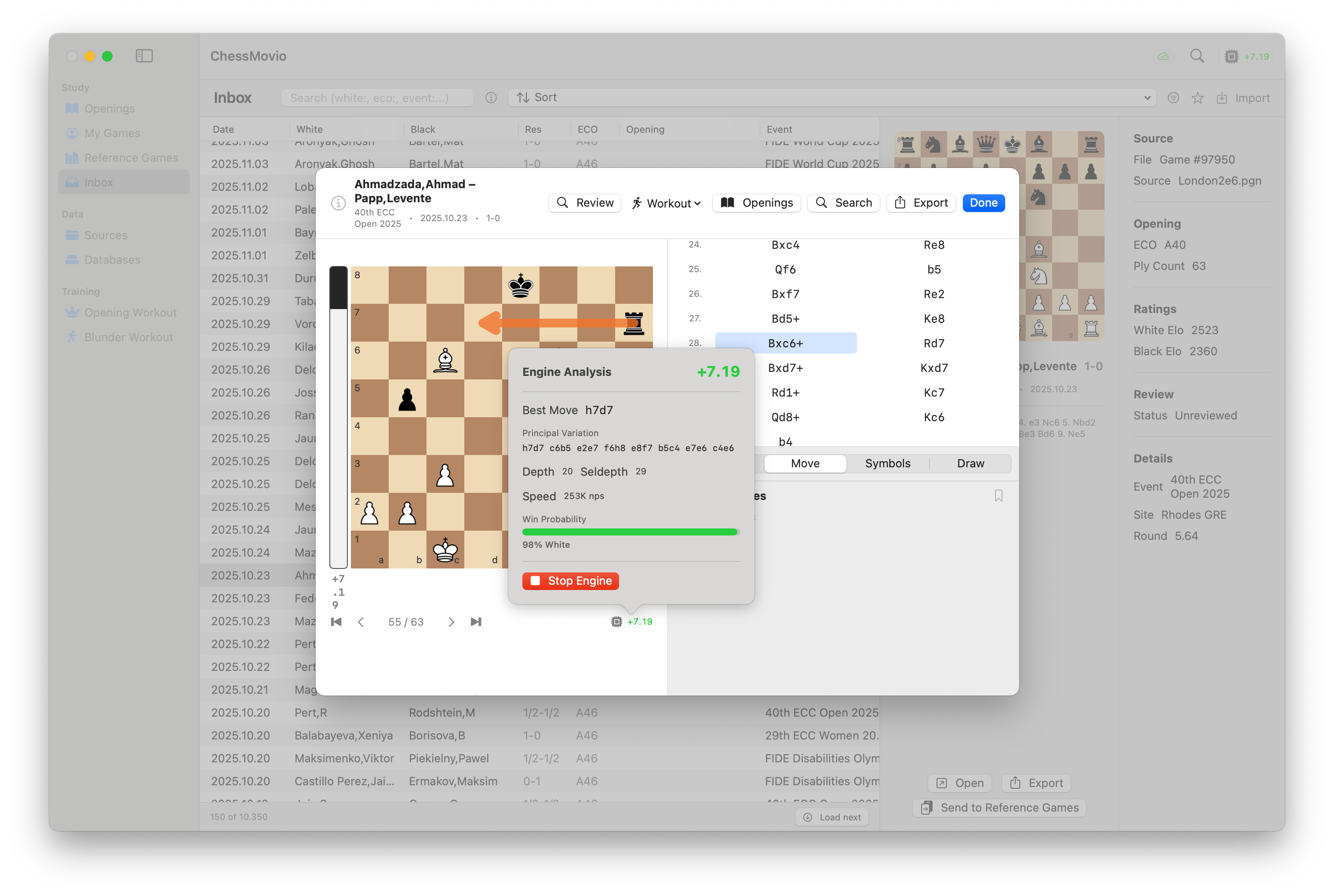 The engine display shows the evaluation score, best move, principal variation, and search statistics
Depth and Performance
Below the main analysis, the engine shows technical details:
- Depth / Seldepth -- How many moves ahead the engine has searched. Higher depth means more thorough analysis.
- Nodes per second (NPS) -- How many positions the engine evaluates per second, indicating computational performance.
- Time -- How long the engine has been analyzing the current position.
Tip: Let the engine run for at least a few seconds before trusting the evaluation. Early evaluations at low depth can sometimes be misleading, especially in tactical positions.
Engine Settings
You can configure the engine's behavior in the app settings:
- Depth -- Set the maximum search depth. Higher depth gives more accurate evaluations but uses more processing power and battery. For most analysis, the default depth is sufficient.
Using the Engine Across the App
The engine is available in multiple contexts:
- Openings Tab -- Analyze any position in your opening tree to verify that your lines are sound.
- Game Workspace -- Analyze your games move by move for post-game review and identifying mistakes to send to the Blunder Workout.
Tip: Use the engine as a verification tool, not a crutch. First try to evaluate the position yourself, then check with the engine. This active analysis builds your chess understanding much faster than passively watching engine evaluations.